
No enterprise runs on a single system. IO Flow by Proteus Tech makes every system work together with AI making the decisions at every step.
Proteus Tech | www.proteustech.in | Workflow Automation
Real enterprise work does not happen inside a single application. It moves between email, ERP, CRM, spreadsheets, and communication tools: one copy-paste at a time. IO Flow replaces that with intelligent automation.
Here is a reality every operations manager knows well: your business processes do not live neatly inside a single system. An enquiry arrives in email. The pricing lives in your ERP. The customer record is in the CRM. The technical specification is in a SharePoint folder. A complete response to that enquiry requires someone to touch four or five different systems, extract information from each, apply business judgement, and put together a coherent reply. Manually. Every time.
This is not just a productivity problem. Every manual handoff is a point of potential error, delay, and inconsistency. And because a significant part of what makes these processes difficult is not the data transfer itself but the judgement involved at each step, traditional automation tools like RPA have always struggled to handle them reliably.
IO Flow, Proteus Tech’s AI-powered process automation platform, is built specifically for this problem.
Why Traditional Automation Falls Short
The Hidden Cost of Manual Process Flows
Consider how many processes in your organisation follow this pattern: someone receives information, extracts what is relevant, does something with it in one system, then takes the output to another system, applies some logic, and moves it forward again. Each step might take only a few minutes. But multiply that by the volume of transactions, and add in the coordination overhead, and you have a significant fraction of your team’s productive time consumed by glorified copy-and-paste work.
Some of these steps follow explicit rules — documented SOPs that any new employee could be trained on. Others are more nuanced: implicit decisions based on experience, relationship history, or contextual factors that experienced team members make automatically but that are never written down. Both types of steps are candidates for IO Flow automation — the explicit rules are configured directly; the implicit judgement is what the AI learns over time from observing how your people handle these situations.
The key insight: AI process automation is not just about connecting systems. It is about replacing the human judgement layer that sits between systems the person who reads, decides, and acts with an AI that can do the same, faster, more consistently, and at any volume.
IO Flow: How It Works
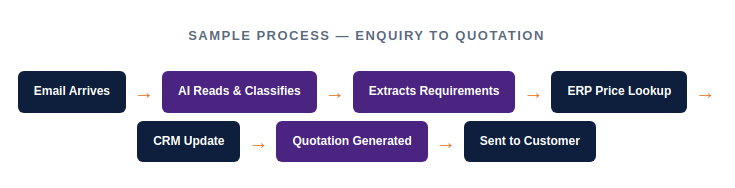
IO Flow connects your enterprise applications: ERP, CRM, email, databases, and file systems and uses AI at each step to handle not just the data movement but the intelligence layer. It reads inputs, makes decisions, executes actions, and moves the process forward whether the next step is in the same system or a completely different one.
Live Use Cases
Use Case 1
A customer sends an email enquiry sometimes a typed message, sometimes a PDF, sometimes a list of product codes in the body of the email. IO Flow reads it, determines it is a sales enquiry, identifies whether the sender is an existing customer, checks what products they are asking about, retrieves the specific pricing tier for that customer from the ERP, fetches the relevant technical data sheets from the document repository, and sends back a complete quotation with the correct pricing and attachments. The sales team’s involvement: zero, until the customer responds.
Use Case 2
When the incoming enquiry is from a new contact, not in the CRM, IO Flow follows a parallel process: it creates a new lead record in the CRM with the extracted contact details and enquiry content, flags it for sales team follow-up, sends an acknowledgement to the customer, and prepares a standard enquiry response while the sales team reviews the new lead. The two streams i.e immediate response and CRM management happen simultaneously, without anyone having to remember to do either.
Use Case 3
Production, logistics, and operations teams frequently deal with processes that touch procurement, inventory, scheduling, and communication systems in sequence. IO Flow handles the handoffs between these systems automatically, applying the logic that currently lives in your SOPs and over time, the logic that currently lives in your experienced team members’ heads.
Step-by-Step: What Happens in the Enquiry-to-Quote Flow
IO Flow monitors your designated inbox. Any incoming communication triggers the process.
Is this a sales enquiry, a support request, a complaint, a payment query? The AI routes accordingly. Only enquiries proceed down the quotation path.
The system checks whether the sender is a known customer by email domain, contact name, or company reference in the message. Existing vs. new customer triggers different sub-processes.
Product codes, descriptions, quantities, and delivery requirements are extracted from the message and validated against your product catalogue.
IO Flow connects to your ERP and retrieves the correct price for the identified customer including any applicable discounts, price lists, or contractual pricing.
Relevant product data sheets, specifications, or certifications are retrieved from your document repository and attached to the response.
A professional quotation email is composed and sent to the customer. The interaction is logged in your CRM.